Use the Minor Feature Code (MFC) Filtering to only show jobs relevant to the vehicle for which you are creating a quote.
Notes:
- MFC Filtering can only be used when you have searched for a vehicle using its VIN or registration number.
- The MFC Filter can be set to default to ON or OFF within the Administration System Settings tab.
Watch this video to learn more!
To turn on the MFC Filter:
- Search for a vehicle using its VIN or registration number.
- In the top left, make sure the MFC Filter toggle is marked ON.
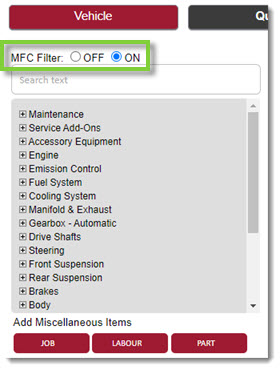
- Menu items that are not applicable for the selected vehicle will be unavailable to add to the quote.
Note: To show all menu items, toggle the filter to OFF.
KB Article #6419